 GridPaw
How to Play Nonogram (Picross)
Nonogram (also called Picross or Griddler) is a paint-by-numbers logic puzzle.
The grid comes with row clues on the left and
column clues on top. Each clue gives the run-lengths of
filled blocks — e.g. 2 2 means "a block of 2 filled cells, at
least one empty cell, then another block of 2". Fill in every cell so that
all rows and all columns match their clues at the same time,
and a hidden picture appears. GridPaw Nonogram is the cat version:
4 guided tutorials, an 11-level campaign, then endless date-seeded
daily puzzles — free, no sign-up. What makes it different from every
other GridPaw game: the solved picture IS the reward — a pixel-art cat flips
to amber in a ≤1s cascade when you finish.
Play at gridpaw.com/nonogram/.
Your First Puzzle
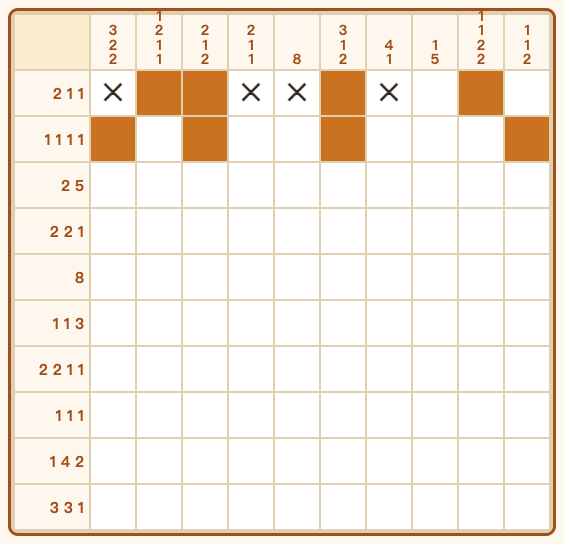
- Open the game. You start on Tutorial 1/4 (green chip). Four tutorials teach the four core ideas with authored cat pictures: Clues are run lengths (Heart 5×5), Gaps must exist (Cat Face 5×5), Edge pinning (Cat Whiskers 7×7), Cross logic (Big Cat 10×10). Each shows a lesson line under the board; you can't get stuck.
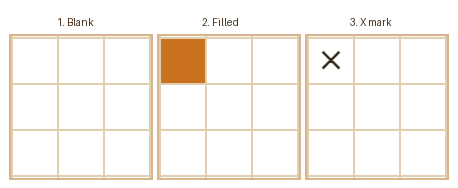
- Mark cells with taps. Tap a cell repeatedly to cycle it: blank → filled ⬛ → cross ✕ → blank. Fill a ⬛ tap on a cell that is empty in the solution and the game auto-corrects it to ✕ with a red shake and counts it as a mistake ("mistake №1") — it never locks your input, it just teaches.
- Match every clue. Keep going row by row and column by column. The puzzle auto-solves the moment the last cell is correctly marked — the win overlay shows the hidden picture lighting up.
Every Button on the Screen
| Control | What it does |
|---|---|
| Level chip (amber; green on tutorials) | Shows your position: Tutorial 1/4 — <lesson> · Level 4/11 — Medium — 10×10 · Daily — Medium 10×10 |
| ↺ Restart | Discards the current board and generates a fresh puzzle at the same level |
| Skip tutorial » (only during the 4 tutorials) | Skips straight to campaign Level 1 — your first Easy 5×5 |
💡 Hint (badge shows 3) | Reveals exactly one correct cell — prefers a cell that should be filled — and tells you where: "💡 Row 3, col 2 is filled — tap it ⬛. (2 hints left)". 3 hints per level, refills to 3 on every new level. (Dev builds show ∞.) |
| Practice Medium | Jumps to the first Medium board: Level 4/11, 10×10 |
| Practice Hard | Jumps to the first Hard board: Level 8/11, 15×15 |
Row/column clues are also clickable: tap any clue (row or column) and its whole line highlights amber for 2.6 seconds — a free way to focus your eyes.

Difficulty Levels
| Stage | Grid | Notes |
|---|---|---|
| Tutorial ×4 | 5×5 → 7×7 → 10×10 | Authored cat art (Heart, Cat Face, Cat Whiskers, Big Cat); auto-advances ~0.9s after each win |
| Easy ×3 | 5×5 | Generator guarantees pure line-logic solvability (no guessing needed) |
| Medium ×4 | 10×10 | Same guarantee |
| Hard ×4 | 15×15 | May require light backtracking — hints matter here |
| Endless Daily | 10×10 / 15×15 | Alternates medium/hard; date-seeded — same board for every player on the same day; comes after the 15 boards (4 tutorials + 11 campaign) |
Campaign order is fixed: 3 Easy → 4 Medium → 4 Hard, shown as Level N/11. Finishing the 11th unlocks the message "Campaign complete! Endless daily puzzles unlocked."

Winning & Sharing
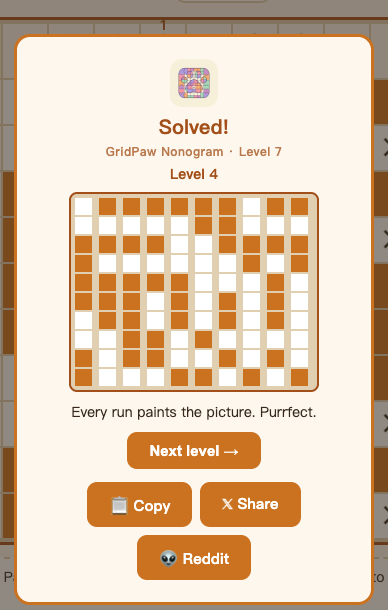
When every cell is marked correctly, the victory popup appears with:
- Win title —
Solved!(campaign) orDaily solved! - Pixel-art reveal — the solved picture's filled cells flip to amber in a ≤1s cascade
- Next level → — moves up one level (tutorials instead auto-advance after ~0.9s with no button)
- Share row (3 buttons):
- 📋 Copy — copies the Wordle-style share text to your clipboard (turns ✅ Copied, 1.5s): "🎨 Uncovered the hidden picture in GridPaw Nonogram Level N — zero wrong taps… mostly 😏 Your turn → gridpaw.com/nonogram/" (daily variant mentions today's cat)
- 𝕏 Share — opens the board card popup first (rendered image of your solved board, 640px, tagged "GridPaw Nonogram · Level N" with the gridpaw.com/nonogram/ footer) ready to post
- 👽 Reddit — same board card, then posts to r/gridpaw with the share text as title
In the board card: 📋 Copy Image (PNG to clipboard), ⬇️ Save (downloads gridpaw-nonogram-levelN.png), 𝕏 Post, 👽 Post, ✕ Close.
Your campaign progress is saved automatically in the browser (gridpaw-nonogram-progress) and resumes on your next visit — but never into the tutorial range.
Frequently Asked Questions
Do I need an account to play Nonogram?
No. Everything works without signing in; there is no account system in this game.
I filled a cell and it flashed red. Why?
That cell is empty in the picture — the game auto-marked it ✕ and counted a mistake. It never locks; just keep going.
It says "Every cell is marked, but the picture doesn't match the clues." What now?
You have ✕ where the picture needs ⬛ somewhere. Review the lines whose clues don't match and fix them.
I'm stuck. What do I do?
Use 💡 Hint: it reveals one certainly-correct cell each time. You have 3 per level — save them for Hard.
Can I play on my phone?
Yes — the whole game is tap-driven, and the board auto-sizes to the viewport.
What is the Daily puzzle?
After the campaign, every level is a date-seeded daily board: same for everyone that day, alternating Medium/Hard, refreshed daily.
Is this the same as the classic Nonogram?
Yes — identical run-length rules. GridPaw just generates unlimited unique puzzles (density fill → derive clues → uniqueness check, Easy/Medium also force pure line-logic solvability) with cat art.
What happens after the last tutorial?
"Skip tutorial »" or finishing Tutorial 4 takes you to campaign Level 1 (Easy 5×5).
Are Hard puzzles solvable without guessing?
They can require light backtracking, but the generator verifies each grid has exactly one solution (solveNonogram count = 1) before serving it.